
What's New in Halaxy: September 2026

Welcome to the September edition of our What’s New newsletter. Last month, we introduced a range of new features and enhancements to Halaxy that make it even easier for you to focus solely on treating patients.
New product features
Here are the top features we’ve released last month.
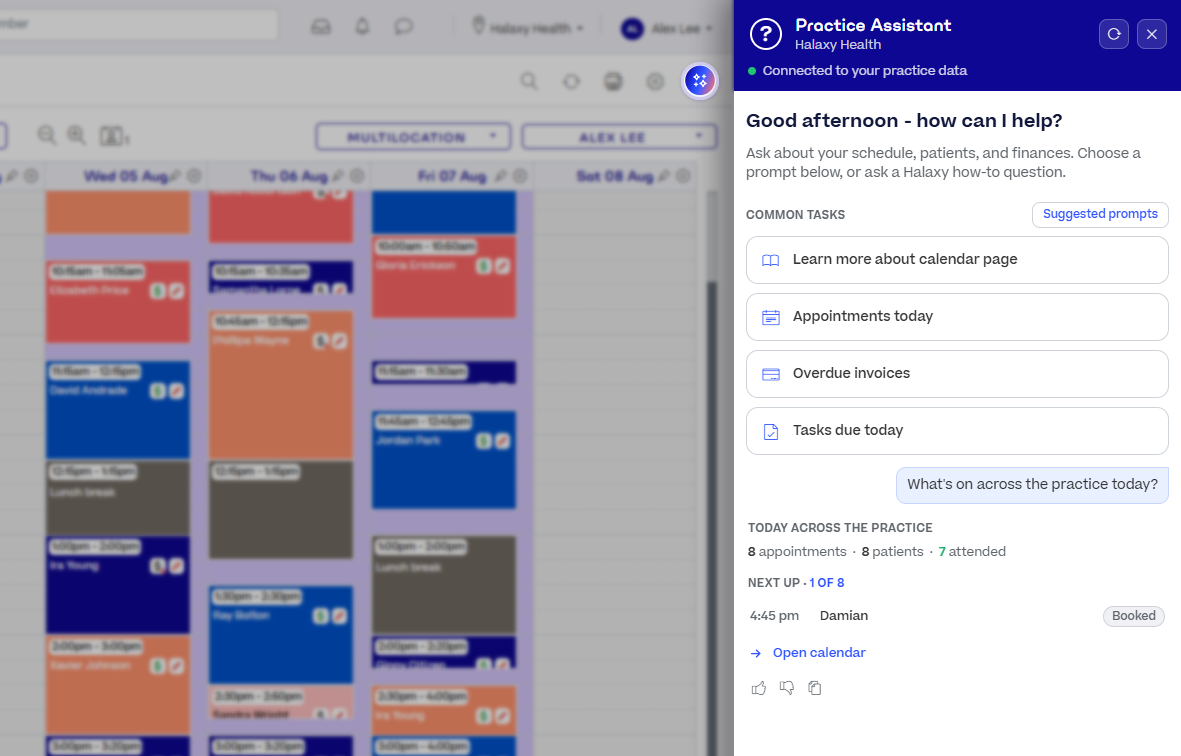
NEW! Practice Assistant is now open to everyone, so the answer is one question away.
Ask in plain language and get an answer in seconds, whether that is where a setting lives, what your day looks like, when you are next free, or which invoices are overdue. Practice Assistant opens beside your current screen and recognises the page you are on, so you can keep working while you check.
It draws on the Halaxy Help Guide and your own practice information, so answers are specific to you rather than a generic article. You control what it can access, and you can configure access to suit your practice.
What this means for your day:
- Find any setting by describing what you want to do.
- Get a straight answer about your own numbers without needing to run a report.
- Ask from wherever you are, without needing to close the page you are on.
Best of all, it is automatically built into Halaxy at no additional cost.
Learn more about Practice Assistant.
Other enhancements
Discover this month’s enhancements that make your workflow smoother and more efficient.
Send prescriptions to the patient portal automatically.
Turn on Auto Share Prescriptions in your patient portal settings and Halaxy shares every prescription for you, so patients can access their prescriptions easily when needed. You can also share several prescriptions at once from the prescriptions report.
Additionally, patients can request repeats from their patient portal. You get a notification, message the patient if you need more detail, then approve, and Halaxy creates the repeat prescription for you. Because both the patient portal and your practice sit inside Halaxy, the whole exchange happens in the one place, which is something no other medical practice management platform can offer.
Learn more about sharing a prescription and managing a prescription repeat request.
Set reminder preferences for each location.
Reminder settings can now sit at three levels: across your whole practice group, at specific practice locations, and on each practitioner individually.
Location level gives a single practice location its own reminder timing and wording while the rest of your group keeps the defaults.
Learn more about reminder settings.
Link fees that always occur together, and book them in one go.
A home visit can have multiple fees, such as a specific fee for travel to the patient, the session itself, and then travel back. A treatment session might be followed by report writing.
With linked fees, you can set those fee relationships up once on your main fee. Booking that main fee creates an appointment for each linked fee and puts every fee on one invoice in the order you set. Each fee keeps its own item number and duration, so you can still bill or edit each fee separately.
You can also link a cancellation fee. When the appointment is cancelled, Halaxy can seamlessly swap the correct fee for you.
For the full list of Halaxy’s latest features and updates, see our release notes.