
What's New in Halaxy: June 2026
Welcome to the June edition of our What’s New newsletter. This month, we introduced a range of new features and enhancements to Halaxy that make healthcare better for everyone, everywhere.


Welcome to the June edition of our What’s New newsletter. This month, we introduced a range of new features and enhancements to Halaxy that make healthcare better for everyone, everywhere.
New product features
Here are the top features we’ve released this month, plus one we're launching today.
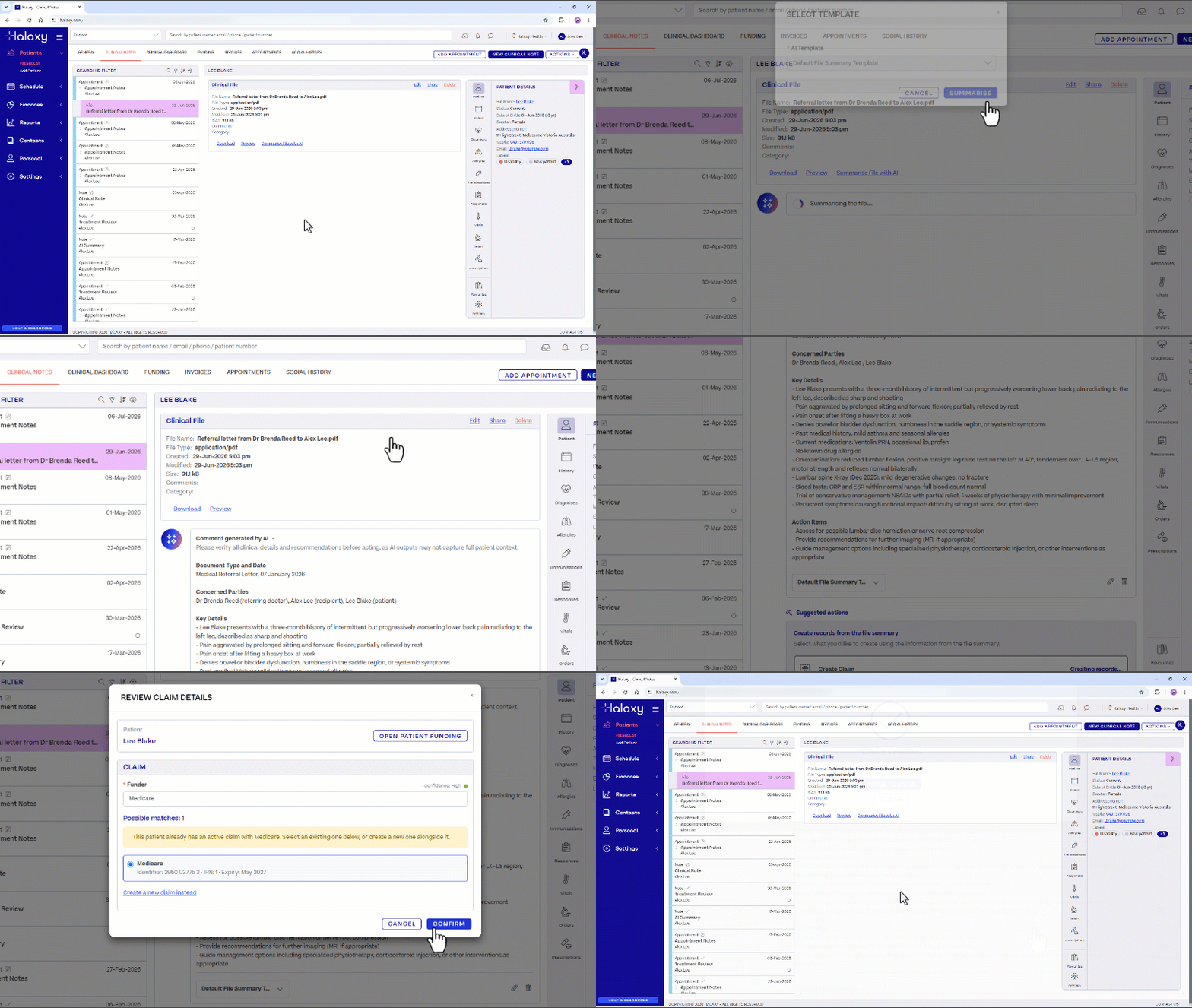
NEW! Let AI-Suggested Actions prefill your next record, so you skip the manual data entry.
Incoming faxes, secure messages, and uploaded files usually mean retyping the same details by hand, minutes lost across the day and another chance for an error to slip in. AI-Suggested Actions take that off your plate.
It joins a growing suite of AI tools built directly into Halaxy, from AI Scribe to AI File Summary, all working in the one platform so your records stay connected, with much more to come.
Generate an AI File Summary and Halaxy suggests the next step. You can create or link a patient, claim, or referral, with the form already filled in from the details it finds.
Suggested Actions appear after a file summary is generated in:
- Fax messages
- Secure messages
- Patient profile attachments
- Clinical note attachments
- Organisation files
You review and confirm, so information reaches the patient record in moments, with less double-handling and fewer errors. This way, you can focus solely on treating the patient while Halaxy handles the rest.
Verbal Assignment of Benefit stays available for 12 months, but Halaxy is ready now.
The Department of of Health, Disability and Ageing (DHDA) in Australia has confirmed a 12-month transition period for the bulk billing assignment of benefit changes. You can continue to obtain verbal assignment of benefit for bulk billed patients in all settings, including telehealth, until 1 July 2027.
Halaxy has everything ready:
Halaxy’s Assignment of Benefits automation is ready to use now, so you can capture documented assignment whenever you choose. You will need it before the transition ends, so start today and stay ahead.
Consent links for pre-assignment claims now send automatically, and processing for Assignment of Benefit requests has been enhanced, removing manual administration from your claiming workflow and helping keep your bulk billing compliant.
What you can use now:
- Send patients an SMS or email link to assign their benefit, before or after the consult.
- Automatically attach the assignment to your existing appointment and invoicing workflows.
- Process rebates automatically, on a daily schedule or at a set time after the appointment starts.
- Prevent automatic bulk bill from processing when no Assignment of Benefit is attached.
- Run the Unprocessed Medicare Report to see what still needs assigning.
Other enhancements
Discover this month’s enhancements that make your workflow smoother and more efficient.
Clinical Notes keep getting better, with more improvements this month.
We’re keeping the momentum going on Clinical Notes. This month brings even more ways to spend less time hunting through records: you can now pin child Clinical Notes to the top of the list, preview your Clinical Notes preferences before you save, and tell at a glance which transcriptions are in progress or need attention.
You can also tailor the notes list to the way you work, switching between expanded or condensed views, grouping notes by type or year, and colour-coding by note type, profession or practitioner so the right notes stand out at a glance.
Clinical Notes continue to work hand in hand with your Clinical Sidebar, keeping consultation notes, files, referrals, AI Scribe transcriptions, AI file summaries, prescriptions, and diagnoses connected in the one patient view.
Make key fields mandatory on Patient Forms, so nothing comes back incomplete.
Know your patient before they walk in. Patient forms collect personal and health details ahead of the appointment, update the profile automatically, and save straight to the clinical note, which means less admin and fewer errors.
Patient forms are completely customisable, from intake forms to consent agreements and questionnaires.
What you can capture in a form:
- Personal and contact details, including emergency contacts and addresses.
- Card payment or bank account details.
- Funding and claim information, such as Medicare card details.
- Referral and referring practitioner details.
- Social history, file attachments, and responses to your clinical templates, tools, and custom questionnaires.
You also get more control over what must be completed. Mark any default section or custom question as required, and a form cannot be submitted until the information your practice needs is provided, so it comes back complete the first time.
Learn more.
New guided Import Data step now available, so your practice data lands correctly the first time.
Switching systems is stressful enough. The Import Data option now guides you from the start, so you choose the right option for your migration and your data comes across correctly the first time.
You can have Halaxy's team migrate your data for you, or import it yourself free of charge, with clearer guidance either way. Practices that use the paid migration service also receive 500 free credits to put towards features such as SMS reminders, online claiming, telehealth and fax.
For the full list of Halaxy’s latest features and updates, see our release notes.
Coming soon
Here’s an early look at what we’re building next, so you can spend more time with patients and less on admin.
Halaxy’s AI Practice Assistant is on the way, to help you get answers without leaving your workflow.
Soon you’ll be able to ask Halaxy what you need, instead of clicking around to find it.
The AI Practice Assistant brings key information and actions into a simple chat, so instead of navigating between different areas, you ask in plain language and get an answer in seconds.
Confirm what your day looks like, when you’re next free, or which invoices are overdue, just by asking the AI Practice Assistant. It opens beside your current screen and recognises the page you’re on, so you can keep working while you check appointments, review availability, or get contextual guidance on how a page works.
Best of all, it will be built into Halaxy at no additional cost.
The AI Practice Assistant is rolling out gradually, starting with a small group of users, with more to come.