
What's New in Halaxy: July 2026
Welcome to the June edition of our What’s New newsletter. This month, we introduced a range of new features and enhancements to Halaxy that make healthcare better for everyone, everywhere.


Welcome to the July edition of our What’s New newsletter. This month, we introduced a range of new features and enhancements to Halaxy that make it even easier for you to just focus on treating patients.
New product features
Here are the top features we’ve released this month, plus one we're launching today.
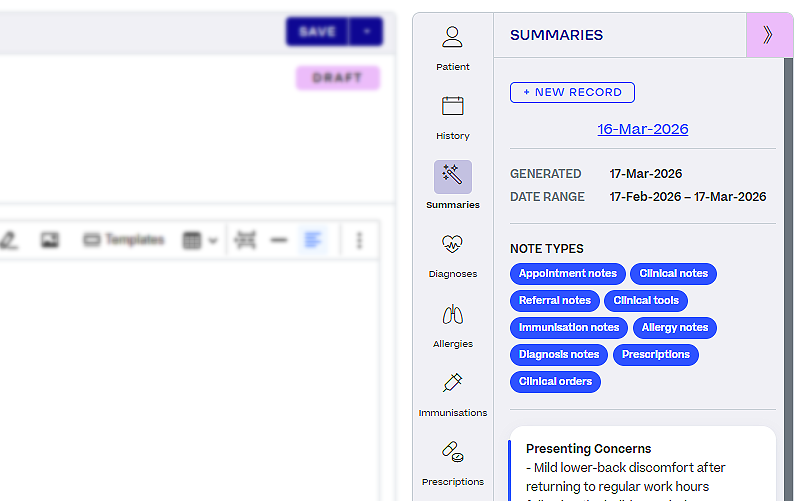
NEW! Summary Notes now sit in your clinical sidebar, so a patient's history is ready before you start.
Reviewing a patient before an appointment usually has meant scrolling back through months of notes to piece together what matters. Summary Notes change all that as they automatically put that overview in the clinical sidebar, right beside the note you are already writing.
Halaxy generates the summary from the patient's published clinical notes, highlighting key information without you having to open each entry. It sits alongside everything else your Clinical Sidebar already keeps in the one place: consultation notes, files, referrals, AI Scribe transcriptions, prescriptions and diagnoses.
What this means for your day:
- Walk into an appointment already across the patient's history.
- Skip the scroll back through previous consultations.
- Keep working in the clinical note, with the summary beside it rather than on another screen.
It joins the suite of AI tools built directly into Halaxy, from AI Scribe to AI File Summary and AI-Suggested Actions, all working in the one platform.
Getting started: Add the Summary tab to your clinical sidebar to start seeing patient overviews as you work. Your sidebar is fully customisable, so you can add it alongside the tabs you already use.
Learn more about patient clinical summary.
Other enhancements
Discover this month’s enhancements that make your workflow smoother and more efficient.
Add a note to any fee on an invoice, so every charge explains itself.
A line on an invoice may be just an item code and an amount, which leaves patients and funders guessing what they are paying for. You can now add fee notes below each fee on an invoice to explain that charge in place.
Use it to record what the service involved, why an amount differs from your standard fee, or the detail a funder needs to approve a claim. Previously this meant renaming the fee itself, which affects every future invoice, or adding a note that applies to the whole invoice and does not say which line it refers to.
Clearer line items mean fewer billing queries coming back to your practice, and less chance of a claim stalling while someone asks what a charge was for.
See referrals directly in your Patient Claim report, without cross-checking other records.
The Patient Claim report now displays the associated referral for each claim, so you get the full picture in one view. Tick Show referral details in the report to turn the column on.
You can also filter the report by the patient's next appointment date, making it easier to work through claims tied to upcoming visits rather than sorting the whole list.
Filter, share and stay across your Auto Payments Report.
The Auto Payments Report gains additional filters this month, so you can narrow results to the payments you actually need to review.
Report notifications are now available for it too, alerting you when new results are generated so you can keep across automatic payments without opening the report to check.
You can also hide patient names when exporting or sharing the report externally, so it can go to a bookkeeper or accountant without exposing patient identities.
For the full list of Halaxy’s latest features and updates, see our release notes.
Coming soon
Here’s an early look at what we’re building next, so you can spend more time with patients and less on admin.
Halaxy’s AI Practice Assistant is now with our first group of testers.
Last month we shared that the AI Practice Assistant was on the way. It is now in the hands of a small group of practitioners, and their feedback has shaped a range of enhancements this month: better awareness of dates and times, context carried across a conversation, and the ability to tell you who your next appointment is with.
Ask in plain language and get an answer in seconds, whether that is what your day looks like, when you are next free, or which invoices are overdue. It opens beside your current screen and recognises the page you are on, so you can keep working while you check.
Best of all, it is built into Halaxy at no additional cost.
Want to try it before the wider rollout? Get in touch with our support team, and we will let you know when a place opens up.