
What's New in Halaxy: May 2026
Welcome to the May edition of our What’s New newsletter. This month, we introduced a range of new features and enhancements to Halaxy that make healthcare better for everyone, everywhere.


Welcome to the May edition of our What’s New newsletter. This month, we introduced a range of new features and enhancements to Halaxy that make healthcare better for everyone, everywhere.
New product feature
Here is the top feature we’ve released this month.
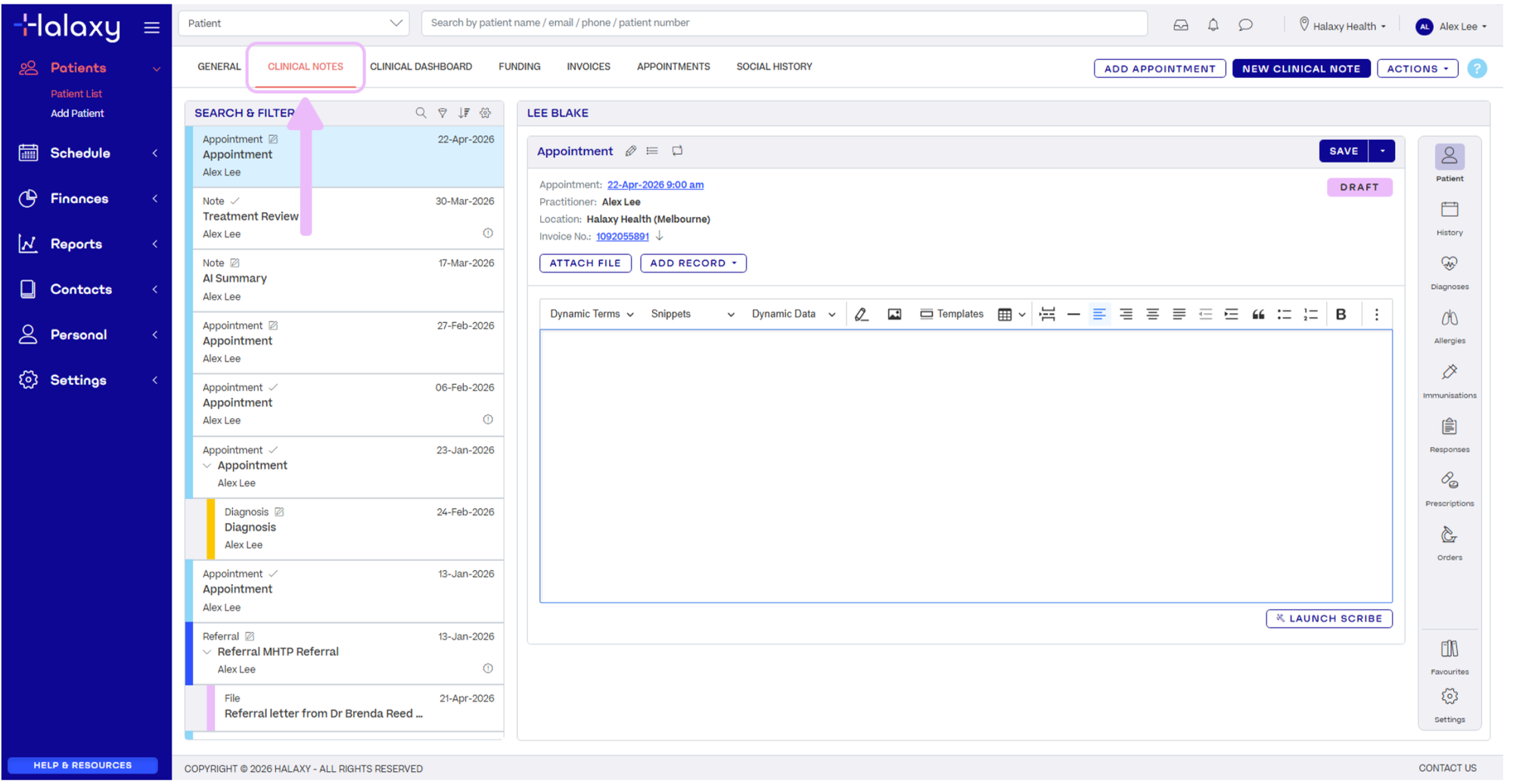
Halaxy Clinical Notes upgrade is now rolled out for all customers.
Your clinical notes experience has been upgraded (free of charge) to make navigating patient records faster, clearer, and more intuitive. Built in collaboration with practitioners across professions, the upgrade introduces advanced filtering, richer text display, improved workflows, and faster navigation, helping you access and action patient information in fewer clicks.
What's new:
- Filter and search patient records faster with advanced keywords.
- Customise clinical notes by type, practitioner, or full display, with colour-coded views, and more.
- Action patient information faster with right-click actions.
- Understand patient history at a glance with AI clinical note summaries.
Practitioners are already seeing real time savings using AI summaries to generate a consolidated view of notes, capture key patient details, and pin a central health summary to the top of the patient record, improving accessibility and reducing time spent navigating individual entries.
One connected patient record
Clinical notes continue to work hand in hand with your clinical sidebar, keeping everything connected in the one patient view. This includes consultation notes, files, images, referrals, AI Scribe transcriptions, prescriptions, diagnoses, and more, all easily accessible when you need them.
Other enhancements
Discover this month’s enhancements that make your workflow smoother and more efficient.
Automate more patient follow-ups with the new Patient Form Report so you never have to chase form completions again.
The new Patient Form Report gives you greater visibility over the status of any form sent to patients, including intake forms, consent forms, questionnaires, outstanding actions, and expiring documentation. This removes time spent manually tracking forms across your practice and improves oversight of documentation ahead of an appointment.
The new report type within Reports > Communication tracks the status of forms sent to patients and lets you filter results by patient, practitioner, form type, completion status, form date, expiry date, and more.
When combined with Halaxy Campaigns, the Patient Form Report automates follow-up communications based on outstanding form activity, removing the need to manually chase patients for form completion.
How to set up automated workflows for the Patient Form Report:
- Save a Patient Form Report that shows incomplete and almost expiring forms.
- Set the report as Campaign to automatically send reminder communications based on incomplete or expiring intake and consent forms, or other practice or workflow requirements. This ensures patients receive automated follow-ups before appointments, improving completion rates while removing administrative workload.
- Use the Campaign report to view or track which automated messages are being sent to patients each day for complete visibility.
Once set up, Halaxy automatically manages workflow follow-ups based on report activity, helping ensure patient form processes are managed efficiently and consistently.
Halaxy AI Scribe now available for any audio file.
Halaxy AI Scribe now supports uploading audio files recorded outside of Halaxy.
Bring historic recordings, dictations, or consultations captured on external devices directly into Halaxy to transcribe and add to your patient record. Simply upload .mp3, .wav, or .m4a files and your audio is automatically converted into a clinical note and transcription within the patient record, keeping all your patient data in the one place.
Halaxy’s AI Scribe now supports both live and uploaded recordings, giving you greater flexibility in how you capture and process clinical documentation, as Halaxy continues to support the way your practice works.
Learn more.
Current prescriptions now available in clinical sidebar.
You can now view and manage a patient’s current prescriptions directly from the clinical sidebar in Halaxy.
Practitioners can mark individual drugs within a published prescription as "current" using a simple toggle. This flag is then surfaced across key areas of the platform, including the clinical sidebar, the clinical notes view, and at the point of prescribing a new medication, making it easier to see at a glance what a patient is actively taking.
Halaxy's current prescriptions helps practitioners:
- Gain a fast, reliable view of what a patient is actively taking.
- Reduce the risk of oversight when managing complex medication regimes.
- Improve prescribing efficiency by surfacing current medications as a starting point for new scripts.
For the full list of Halaxy’s latest features and updates, see our release notes.